


Jacket Configurator Prototype
This was a university group project, where we had to create a configurator interface for a special jacket. It was made using Figma and Blender. The interface is fully interactable and the 3D model of the jacket can be viewed from different angles.You can try out the Figma Prototype here:
Overview of design decisions:
Color:
The interface appears clean and high-quality due to the light color tones. To create contrast between individual elements, a pale blue tone reminiscent of a nautical theme has been used. Additionally, a stronger blue tone has been applied to highlight selected objects and important elements.
Layout:
The configurator consists of two parts: the upper half, where a rotatable preview of the jacket is always visible, and the lower half, where options can be selected. This ensures a clear view of how the jacket looks with the current options.
UX:
The configurator has been optimized for smartphones. The interface is kept minimalist, and all buttons are adapted for easy finger selection without accidental clicks. To efficiently use the smaller screen, customization options are divided into multiple pages, switchable with buttons, providing a linear and clear user experience. A progress bar at the bottom indicates the user's position, and a preview image indicator shows there is a second view. At the end, the user receives a clear summary of selected options and the final price. From here, users can go back to make further adjustments.
Explanation of Various Elements:
- For size selection, buttons were used to display all options at a glance since minimal information needs to be conveyed.
- Color selection is also done through buttons, displaying the color directly on the button, eliminating the need for additional descriptions.
- For hood selection, where more text is required, these options are consolidated in a dropdown menu to save space.
- Toggleable options have a selectable box next to the product description, allowing users to toggle options on or off with a simple tap.
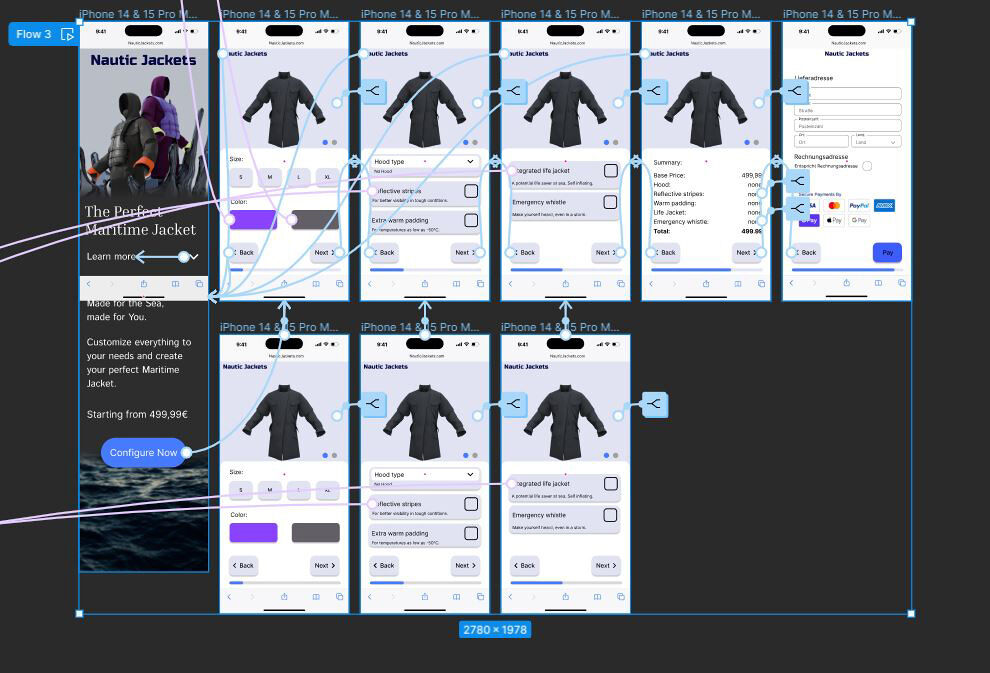 Screenshot from Figma file. Final Prototype.
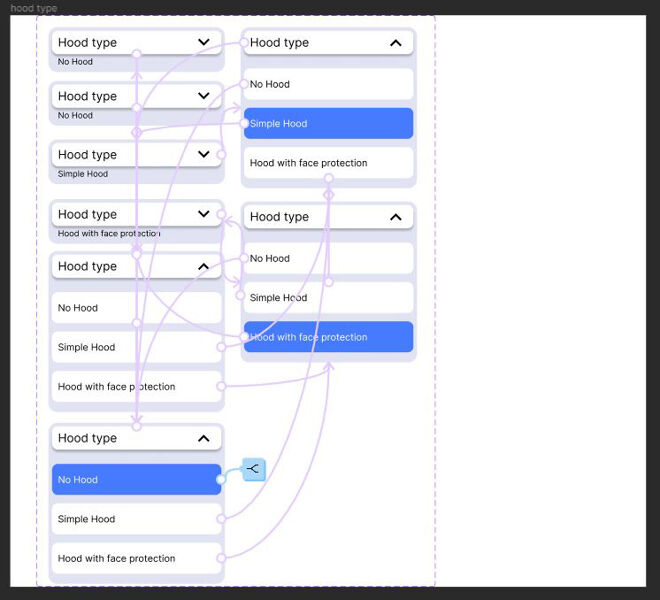 Screenshot from Figma file. Dropdown menu component with
interactions.
Screenshot from Figma file. Dropdown menu component with
interactions.